
Northern lights Christmas wallpaper for Mac that changes through the day
Short answer
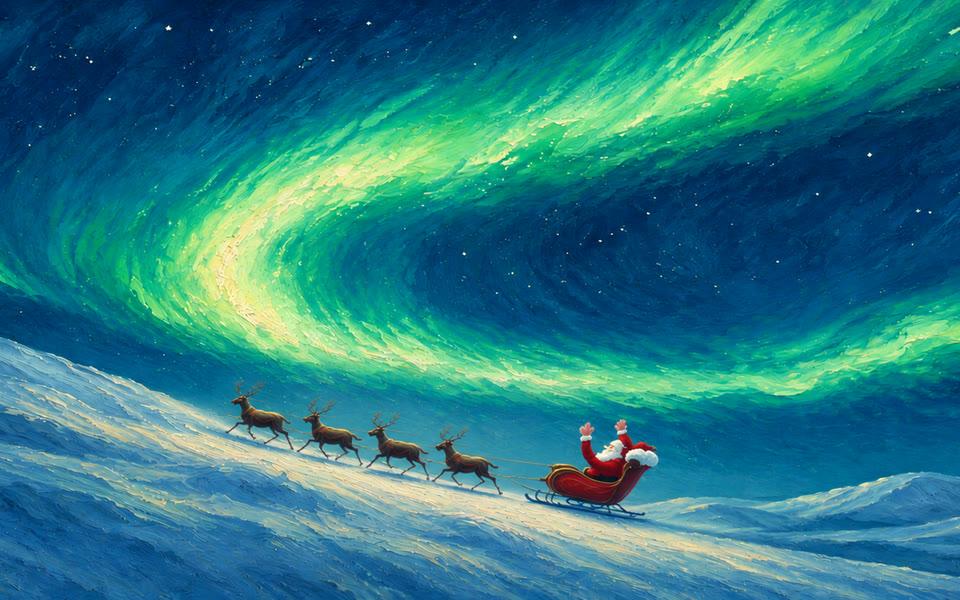
KoiArt's Santa wallpaper is a painted Christmas scene of Santa's sleigh under the northern lights. It has 8 pictures, one for each time of day, and macOS moves through them with the clock: Santa loads the sleigh at dawn, elves chase him with a gift in the morning, and the northern lights fill the sky at night. Open Wallpapers in KoiArt and click Santa to set it on every screen.
A Christmas card that moves with the clock
It's a snowy hillside under a huge sky. Santa's sleigh and four reindeer stand on the slope, and the sky goes from a pink dawn to a bright blue midday to a deep green night. It's painted, not a photo, so it feels more like a Christmas card than a stock picture.
Each time of day has its own little moment, so it's worth a look now and then.
What each time of day shows
| Time of day | What's happening |
|---|---|
| Dawn | Santa pushes the loaded sleigh up the hill under the last of the northern lights. |
| Sunrise | He's off. The reindeer's breath steams in a pink and orange sky. |
| Morning | Two elves run after the sleigh with a gift it nearly left behind, and Santa waves. |
| Midday | The same chase, under a bright blue sky and white clouds. |
| Golden hour | Santa takes a break with a hot drink in the low, warm sun. |
| Sunset | He stands up and points the way under a fiery red sky. |
| Dusk | The sleigh's lantern is lit, and the first northern lights come out. |
| Night | Green northern lights sweep across a sky full of stars. |
How to set it on your Mac
- Open KoiArt and go to Wallpapers.
- Click Santa. It's set on every screen at once.
- Keep Changes with the day on, so it moves from dawn to night with the clock.
- Or pick one time under Or keep one all day. Night is the one with the brightest northern lights.
- Want snow in front of it? Go to Effects and pick Snow or Heavy snow.
Sharp on an ultrawide, too
Each picture is 5120 × 2194, a wide 21:9 shape, so it fills an ultrawide monitor without stretching. On a MacBook, macOS trims the sides a little and the sleigh stays in the picture. More in Christmas wallpaper for ultrawide.
Its Christmas twin: a snowy village
Prefer something cozier? The Christmas wallpaper is a snowy village with a giant tree, painted the same way, from dawn to night. Both look best with snow falling on top. See all of them in Christmas wallpapers for Mac.
Questions people ask
Is it a live wallpaper?
The painting itself is still, but it changes 8 times a day. For motion, turn on Snow and it falls in front of the picture, drawn live, never a video loop.
Does it change when KoiArt is closed?
Yes. macOS moves through the times of day by itself, even when KoiArt is closed.
Can I keep the northern lights all day?
Yes. Under Or keep one all day, pick Night.
Does it work on more than one screen?
Yes. One click sets it on every screen.
How much is it?
$9 once for 1 computer, or $15 for 5 computers, Mac or PC. No subscription.